Electronic PINs Take Over Cards!
Prepaid Wireless PINs infer a number of well known terms, all meaning essentially the same thing: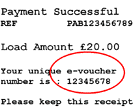
- Topup
- Replenishment
- ePINs
- Airtime
What does electronic distribution really mean? This method actually evolved after prepaid wireless cards, and basically means that PINs are never printed on physical media that hangs on a display peg at the store. Rather, stores use their terminals (similar to the terminals you swipe your credit or debit card in at the grocery store for example) to request a PIN sale. The PIN is then pulled immediately from a back end, secure database and delivered to the terminal. The clerk can then give you a paper receipt with the PIN printed on it. It seems so simple, and yet there is actually a lot of technology behind this process, but that's a topic for another page!
Replenishment receipts typically include the following general characteristics:
- Display the amount (often referred to as "denomination"), which is the value of the PIN (this can be different from the amount you actually paid for it - more on this later!)
- Instructions on how to redeem your PIN (i.e. how to add the money to your prepaid wireless account)
- Legal terms and conditions
- The date of the sale
- The store name and address
- A transaction ID or control number that identifies the specific sale
- A phone number to call should you have a problem
PINs have the following significant advantages over physical cards:
- There is no physical inventory, which means that there is no product production, shipping, or warehousing. You can only imagine the cost savings here.
- Because there is no physical inventory, you essentially do away with the risk of running out of cards to sell, or having to worry about forecasting the right amount of each denomination (ex. $20, $30, $50). Having managed card forecasting, ordering, printing, and distribution in the past, it always amazes me the time, effort, and cost of this process.
- Inventory doesn't get old or stale. With cards, the company's brand or colors can change, instructions on the back can change, terms and conditions can change, etc. There is a tremendous cost to destroy outdated inventory, and because of the fear of running out of inventory, most carriers have three to six months of inventory on hand at any given time. So, if you don't want to spend the money to destroy the inventory, it could take a long long time to sell through the old stock. With PINs you don't have this problem! Inventory is managed electronically, and information printed on the receipts can be changed within a matter of days or weeks.
- Problems can be fixed much more easily. Consider if the wrong PINs are printed on cards, or if the PINs are compromised in some manner (ex. stolen!). Destroying physical inventory, as discussed above, is a huge cost and headache. On the other hand, destroying an electronic database is quick and easy.
- New products can be easily introduced with minimal effort and risk. For example, let's say that you want to test whether a $10 denomination would be popular, but are concerned that it might negatively affect your revenue (because the lowest denomination was previously $20). If you take the physical card route, it will not only take you months to get into the marketplace, but if it's successful, it will take you months (and lots of money!) to get it out. On the other hand, creating $10 electronic PINs is cheap and fast, and can be removed from the system very easily if unsuccessful.
There are also some disadvantages to electronic products:
- They're not pretty! Consider a nice, vibrant, colorful, company branded card on the shelf that you can buy and take home with you. That's certainly much more compelling than taking home a PIN printed on an ugly black and white paper receipt. We've learned from Apple's products that customers will often prefer to buy things that are prettier even if they lack features.
- Electronic databases can be much more easily compromised (i.e. fraud!). Stealing a file is much easier than walking off with a carton or massive pallet of cards from a warehouse.
- Receipts are much easier to lose or get ripped/damaged before you get a chance to redeem the PIN onto your account.
Generally, carriers and a good proportion of retailers and distributors, much prefer electronic PINs over cards. Over the past years you will have seen a significant decrease in the distribution of cards, and a big push to electronic products. However, big retailers (ex. Walmart, Target, Best Buy) still do better with physical inventory hanging on the shelf, and operationally at the checkout lane, activating a card is less of a hassle than printing a PIN. Ultimately, however, I expect all products to be virtual even if there is marketing collateral hanging on the shelf.
Home
›
Adding Money
›
PINs
| Be Heard! Let prepaid wireless providers know what you want; fill out the survey now. |



Copyright 2008-2023 Prepaid-Wireless-Guide.com - All Rights Reserved
Click to read the Privacy Policy
Comments
Have your say about what you just read! Leave a comment in the box below.