Prepaid Wireless Cards Revealed!
Prepaid Wireless Cards go by many names: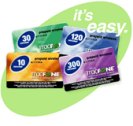
- Topup Cards
- Replenishment Cards
- Payment Cards
- Airtime Cards
- Refill Cards
Prepaid wireless cards all typically have the same general characteristics:
- They display the dollar amount (often referred to as the denomination), which is the value of the card (this can be different from the amount you actually pay for it due sales tax at the point of sale).
- A scratch off section on the back with a PIN (Personal Identification Number) underneath - typically 10-15 digits long.
- Instructions on how to "redeem" your PIN (i.e. how to add the money to your wireless account).
- Legal terms and conditions (usually too small and awkward to read!).
- A
customer support phone number to call should you have a problem with
the card.
Ever wonder why some stores hang their prepaid wireless cards on the shelf in plain view, while other stores keep them locked up behind the counter or in the safe in the back in the back of the store?
It's all about theft! Depending on the technology in the store, you'll see cards sold in different ways.
POSA (Point Of Sale Activation)
I know what you're thinking...what's that?! Well don't worry, most people I worked with had the same question. Unless you're working behind the scenes directly with these products, it's a pretty unusual thing to just know off the top of your head. The good news is that it's easily demystified. POSA stands for "Point Of Sale Activation." So what does that mean?
 POSA addresses theft...
Consider a big retail store like Target or Walmart. They want their products to hang on the wall so they're easy for you to grab, throw in your cart, and take to the checkout stand. Unfortunately, there are some people out there who aren't honest like you and I, and instead of throwing that $20 prepaid wireless card in their cart, they place the card in their back pocket and walk out of the store without paying. A sad, but true reality.
So, to allow stores to hang these prepaid wireless cards on the shelf without the risk of theft, inactive, or "cold cards" are kept on the shelf. So if the card is stolen without being purchased, it simply won't work. It's pretty straightforward in concept, however, the activation process involves some technology.
How does POSA work?
Basically, the store's sales register is connected to a technology vendor. When the clerk scans or swipes the card for you, they are actually capturing the serial number of the card (not the PIN!). They send that serial number to the technology vendor. The technology vendor then looks up the PIN that's tied to that serial number and activates the PIN (often referred to as turning it "hot"). If this activation process is successful, the clerk receives a success response on their register. This tells them that the card is now good to go, and they can sell you the card. It's important to note that all of this happens in real time while you're standing at the register in literally seconds. Now you can leave the store and redeem the card! It's really analogous to how a credit card works by checking with your bank in real time whether you have sufficient credit available on your card for the purchase; it's a real time validation.
Non-POSA, or Hot Cards
Having just learned about POSA above, you know the hard part. Non-POSA (i.e. not POSA) cards are simply cards that are hot in the store. Smaller stores like independent wireless dealers used to use these are their main product as it doesn't require any real time capable technology. These stores are much more intimate than large retailers, and they don't have to worry about putting all of their products on the shelf. Most of these dealers will keep their wireless cards in the cash register or even in the back locked in a safe. Seriously! Think about these cards as a stack of cash. You definitely wouldn't want to leave them lying around. Note, however, that prepaid wireless carriers have largely eliminated this card type, and you can consider it to be an extinct product. I include it here so as to represent all possible refill products, and for completeness.
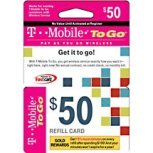
Safeguarding Cash (i.e. Hot Cards)
What you might be asking yourself now is 'how do they get the cards in the first place'? It definitely wouldn't be safe for the carrier to produce, warehouse, and ship stacks of prepaid wireless cards that are essentially piles of cash! Hopefully none do. Although I can't speak to what all of the carriers have done in the past, I do know that the industry standard process was to produce the cards cold, store them in the warehouse cold, and even ship them to the stores cold. Then, when the dealer receives a shipment of cards, they use various tools to contact the wireless carrier. The carrier then activates some or all of the cards at the dealer's request. They call this "bulk" or "batch" activation.
As you can imagine, Hot cards have many risks (i.e. storing wads of cash in your store), however, it was a great solution for low tech stores that don't have partnerships or technology to support more advanced procedures. It's actually fair to say that Hot cards were the original replenishment products for most major prepaid wireless carriers.
Home
›
Adding Money
›
Prepaid Wireless Cards
| Be Heard! Let prepaid wireless providers know what you want; fill out the survey now. |



Copyright 2008-2023 Prepaid-Wireless-Guide.com - All Rights Reserved
Click to read the Privacy Policy
Comments
Have your say about what you just read! Leave a comment in the box below.